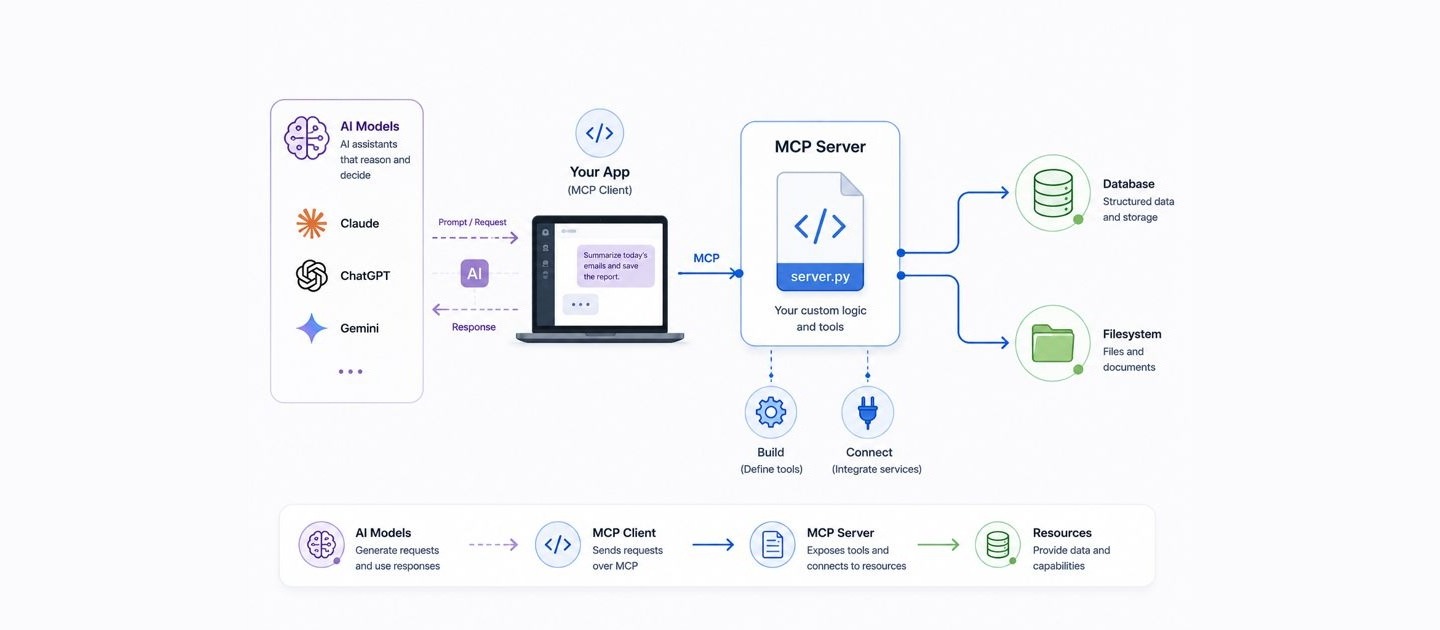
In the last post I explained what MCP is: a universal plug that lets any AI use your tools and your data. Now let’s build one. By the end of this you will have a small server that lets Claude search your own notes, and the same shape works for a database, an internal API, or live data the model cannot know on its own.
One heads up before we start. Most tutorials you will find online still use the old FastMCP import, and it breaks on the current SDK. Everything below is tested against mcp version 2.0, so it actually runs.
What you are building
A tiny program that exposes one tool the AI can call. Think of it as an employee with a single skill and its own key. The AI never sees your files or passwords. It just asks your server to do the job, and your server does it and hands back the result.
Step 1: Set up
You need Python 3.10 or newer. Make a folder and a clean virtual environment, then install the official SDK with its command line tools:
mkdir notes-mcp && cd notes-mcp
python3 -m venv .venv && source .venv/bin/activate
pip install "mcp[cli]"
Step 2: Write the server
Create a file called server.py. A normal Python function becomes a tool the moment you add the @mcp.tool() decorator. The function name and its docstring are exactly what the model reads to decide when to call it, so write them clearly.
from mcp.server import MCPServer
from pathlib import Path

mcp = MCPServer("notes")
NOTES = Path.home() / "notes"


@mcp.tool()
def search_notes(query: str) -> str:
    """Search my Markdown notes and return matching lines."""
    hits = []
    for file in NOTES.glob("**/*.md"):
        for line in file.read_text().splitlines():
            if query.lower() in line.lower():
                hits.append(f"{file.name}: {line}")
    return "\n".join(hits[:20]) or "No matches."


if __name__ == "__main__":
    mcp.run()
That is a complete, working server. It reads the Markdown files in a notes folder in your home directory and returns the lines that match. Nothing fancy, but it is a real capability the AI did not have a second ago.
Step 3: Where the keys go
The access lives inside your function, never in the model. If instead of reading files your tool calls an external API, the key sits right there, loaded from an environment variable so it never ends up in your code or in the chat:
import os
import requests


@mcp.tool()
def get_weather(city: str) -> str:
    """Get the current weather for a city."""
    key = os.environ["WEATHER_API_KEY"]  # your key, kept out of the model
    response = requests.get(f"https://api.example.com/now?q={city}&key={key}")
    return response.json()["summary"]
The AI only ever says “get the weather for Bogota.” Your code holds the key and makes the call. That separation is the whole security model.
Step 4: Test it before wiring it up
The SDK ships a visual inspector, a small web page where you click your tool and watch it run. It needs Node installed, then:
mcp dev server.py
Open the page it prints, call search_notes with a query, and confirm you get the right lines back. Testing here first saves you from debugging inside a chat window later.
Step 5: Give it to Claude
One command installs your server into Claude Desktop:
mcp install server.py
Restart Claude, ask it to search your notes in plain language, and it will call your tool, asking your approval on each run. If your tool needs a secret, pass it at install time and the SDK stores it for you:
mcp install server.py --env-var WEATHER_API_KEY=your_key_here
Where to take it next
That is the entire trick: small connectors, each holding one key, and the AI simply directs them. The same server.py plugs into ChatGPT, Cursor and any agent framework with no extra work, because they all speak MCP.
Start with notes, then point it at the thing you actually wish your AI could reach. A few ideas that take an afternoon each:
- A tool that queries your production database, read only, so you can ask questions in plain English.
- A tool that opens tickets in your issue tracker straight from a conversation.
- A tool that pulls a customer record from your own API before you reply to them.
Build one, keep its reach small, and you have given every AI you use a new sense.